
Tutorial: Secure Database Access Without Exposing Your Database to the Internet
Overview
A publicly accessible database port is one of the most common attack surfaces for production environments. Attackers continuously scan the internet for exposed PostgreSQL (5432), MySQL (3306), and MongoDB (27017) ports, looking for misconfigurations, weak credentials, or leaked connection strings.
Traditional approaches reduce risk by combining IP allowlists, SSL enforcement, secrets management, and database authentication. While these are all recommended security practices, the database service remains reachable from the public internet.
OpenVPN Access Server takes a different approach by providing VPN-only access to your database. Rather than protecting an exposed database port, Access Server removes it from the public internet entirely. Only authenticated VPN users can attempt a connection, and you can further restrict access to specific users or groups with Access Server's access controls.
This tutorial covers two common deployment scenarios:
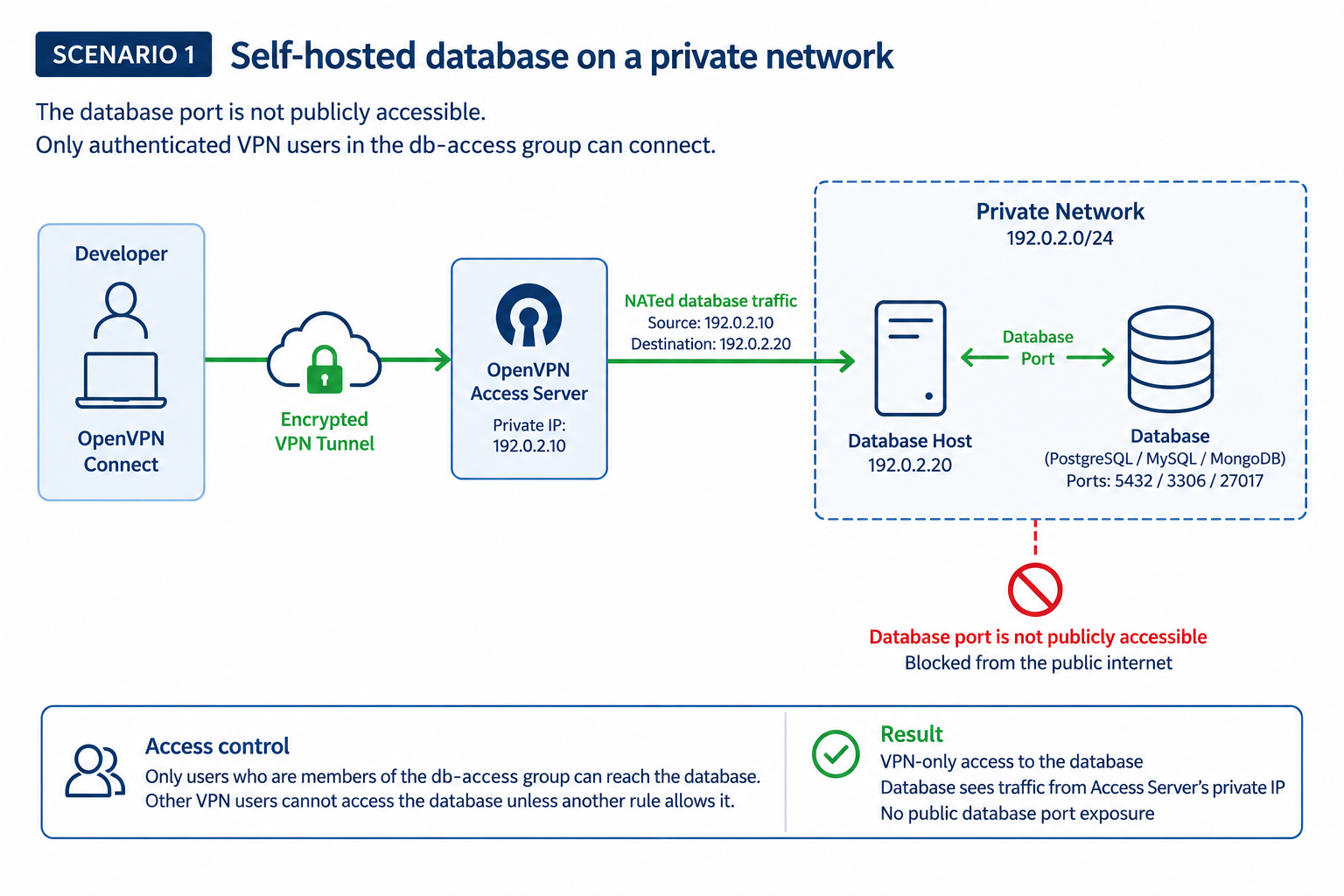
Scenario 1: Secure a self-hosted PostgreSQL, MySQL, or MongoDB database running on a private network.
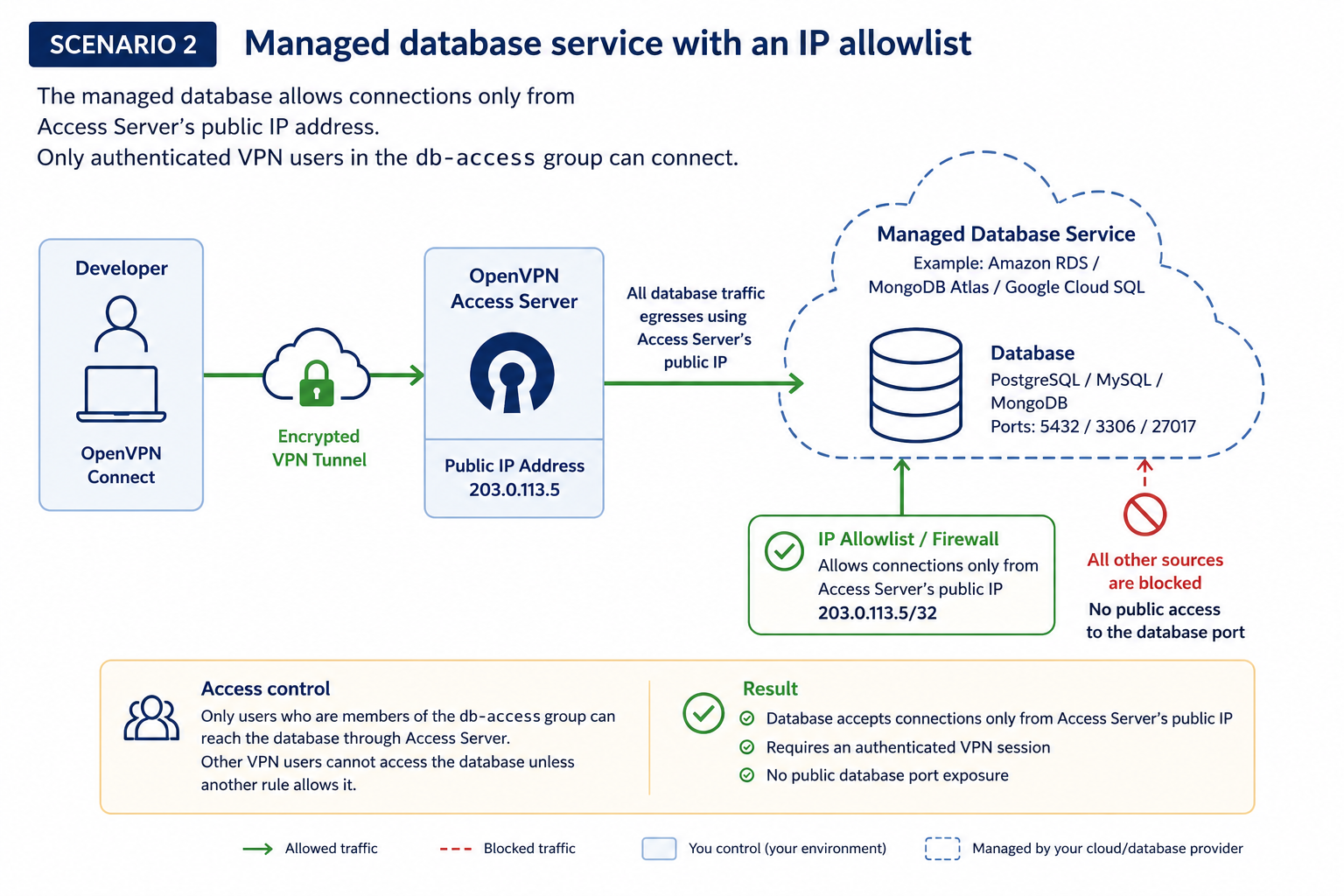
Scenario 2: Secure a managed database service, such as Amazon RDS, MongoDB Atlas, or Google Cloud SQL, by configuring an allowlist that permits connections only from Access Server's static egress IP.
Prerequisites
Access Server installed.
An Access Server user group created called db-access.
OpenVPN Connect installed on developer devices.
A database client appropriate for your database platform.
For Scenario 1, you'll also need:
A self-hosted PostgreSQL, MySQL, or MongoDB server on the same private network as Access Server, or reachable through subnet routing.
For Scenario 2, you'll also need:
A managed database service that supports IP allowlists, such as Amazon RDS, MongoDB Atlas, or Google Cloud SQL.
Example environment
Component | Example value |
|---|---|
Access Server public IP |
|
Access Server private IP |
|
VPN client subnet |
|
Database host |
|
PostgreSQL | TCP 5432 |
MySQL | TCP 3306 |
MongoDB | TCP 27017 |
Authorized group | db-access |
Scenario 1: Secure a self-hosted database on a private network
Use this scenario when you host your own PostgreSQL, MySQL, or MongoDB database on a private network that's reachable from Access Server.
The goal is to remove the database port from the public internet so it's accessible only through an authenticated VPN connection.
Scenario 2: Secure a managed database service with an IP allowlist
Use this scenario when your database is hosted by a managed service such as Amazon RDS, MongoDB Atlas, or Google Cloud SQL.
Unlike a self-hosted database, a managed database service can't usually be placed entirely on your private network. Instead, you can configure an allowlist so the database accepts connections only from Access Server's public IP address (static egress IP). Developers connect through the VPN, and all database traffic exits through Access Server using its public IP address.
Results
Before | After |
|---|---|
Database port publicly reachable. | Database accepts connections only from Access Server's public IP address. |
Database access based only on credentials. | Database access requires valid credentials and an authenticated VPN session. |
Any source matching the allowlist can connect | Only members of the db-access group can reach the database through Access Server |
Developers manage changing client IP addresses | Developers connect through a consistent static egress IP |