Tutorial: Connect VPN Clients to Another EC2 Instance in AWS When Access Server Uses Route Mode
Overview
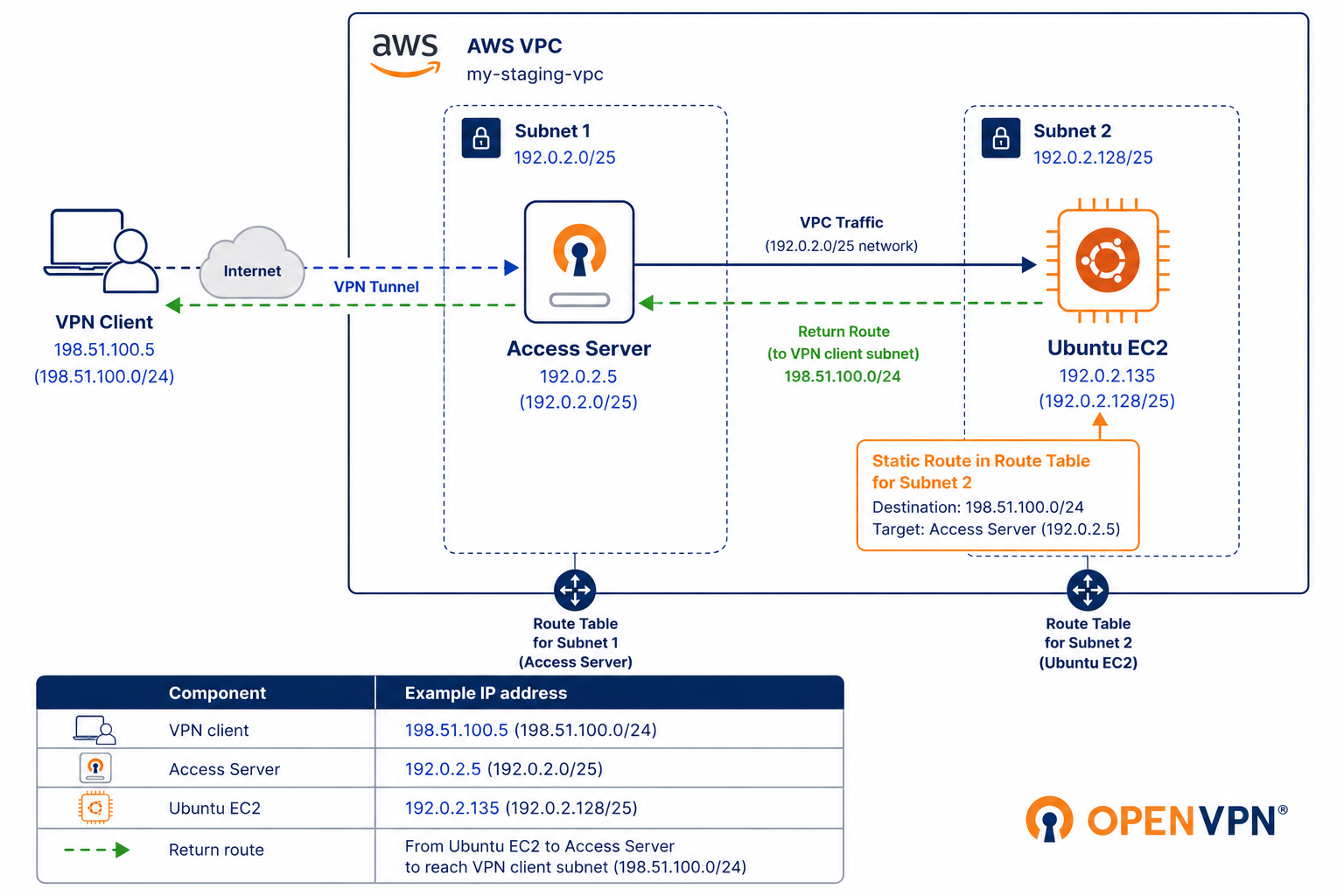
When Access Server operates in Route mode, VPN clients receive IP addresses outside the AWS VPC subnet. As a result, EC2 instances in the VPC don't have a return route to the VPN client subnet by default, so communication fails until you add a static route.
This tutorial shows how to configure AWS route tables and Access Server so VPN clients can communicate with another EC2 instance in the same VPC.
Prerequisites
Access Server deployed.
Admin Web UI access.
One or more users or groups configured in Access Server.
Ensure the following AWS resources are available:
A VPC containing the Access Server and the target EC2 instance.
A subnet for the Access Server EC2 instance.
A subnet for the target EC2 instance.
A route table associated with the Access Server subnet.
A route table associated with the target EC2 instance's subnet.
Example environment:
EC2 Instance | VPC | Subnets | Private IPs |
|---|---|---|---|
Access Server | my-staging-vpc | 192.0.2.0/25 | 192.0.2.5 |
Ubuntu | my-staging-vpc | 192.0.2.128/25 | 192.0.2.135 |
VPN client subnet | Configured in |
|---|---|
198.51.100.0/24 | Access Server's Global Access Rules (Network Settings) |