
Tutorial: Create a Site-to-Site Network with Access Server
Overview
A site-to-site VPN connects two or more private networks over a secure, encrypted tunnel. This allows devices on separate networks—such as a headquarters (HQ) network and a branch office—to communicate as if they were on the same local network.
In this tutorial, you'll configure a site-to-site (or site-to-branch) VPN using:
Access Server hosted on the headquarters network.
An OpenVPN client acting as a site-to-site connector on the branch network.
Traffic between the two networks is encrypted and routed through the VPN tunnel.
Prerequisites
Access Server installed on a Linux system in the HQ network
Internet access and a private IP address for Access Server
Port forwarding so Access Server is reachable from the internet
A public IP address or DNS record for Access Server
Administrative access to:
The Access Server Admin Web UI
Routers, firewalls, or gateways on both networks
Distinct (non-overlapping) subnets for each network
Example site-to-site setup
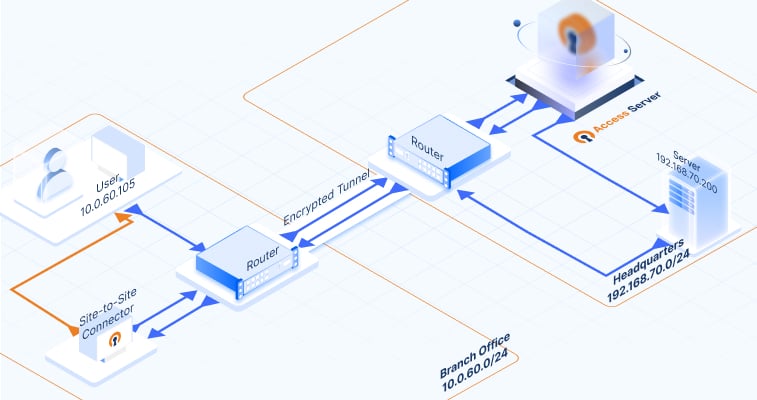
Notice that the diagram of our example setup includes the following IP addresses and subnets:
Device | IP address |
|---|---|
Access Server (OpenVPN server) | 192.168.70.222 |
Site-to-site connector (OpenVPN client) | 10.0.60.55 |
Network | Subnet |
|---|---|
Headquarters | 192.168.70.0/24 |
OpenVPN virtual network | 172.16.0.0/20 |
Branch office | 10.0.60.0/24 |
We'll use the IP addresses and subnets for our example procedure. As you set up your site-to-site VPN, use your specific IP addresses and subnets for your devices and networks in the appropriate steps.