
Tutorial: Add iVALT Two-Factor Authentication to Access Server
Overview
Add iVALT two-factor authentication (2FA) to Access Server to enhance VPN security with iVALT's biometric authentication system. This integration provides remote, encrypted connections for users and more secure authentication.
Access Server also has built-in TOTP MFA support.
When you integrate iVALT 2FA, your user logins include biometric verification. The diagram shows how the authentication flows with the setup.
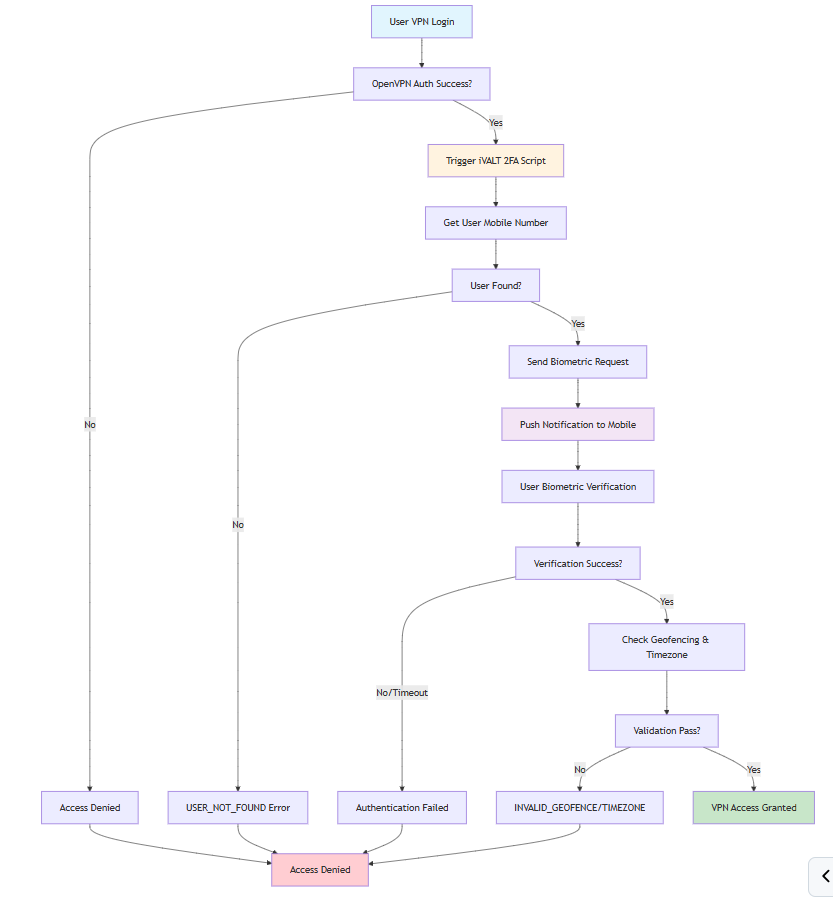
User attempts VPN connection.
Initial authentication (local/PAM/LDAP/RADIUS) succeeds.
Access Server notifies iVALT via HTTPS API to begin the 2FA procedure.
The post-auth script retrieves the user's mobile number from iVALT.
A biometric authentication request is sent to the user's mobile device.
The user confirms via biometric verification.
The script validates geofencing and timezone.
VPN access is granted or denied based on the result.
Prerequisites
An iVALT account.
An installed Access Server.
Console (SSH) access with root privileges.