Tutorial: Configure LDAP Group Mapping With Post-Auth Script
Overview
With Lightweight Directory Access Protocol (LDAP), users can connect to your Access Server with their LDAP credentials and access resources. You can configure the access control rules to grant access globally for all users or on a per-user and per-group basis. Typically, the server administrator manually assigns users to groups, but you can automate group assignments.
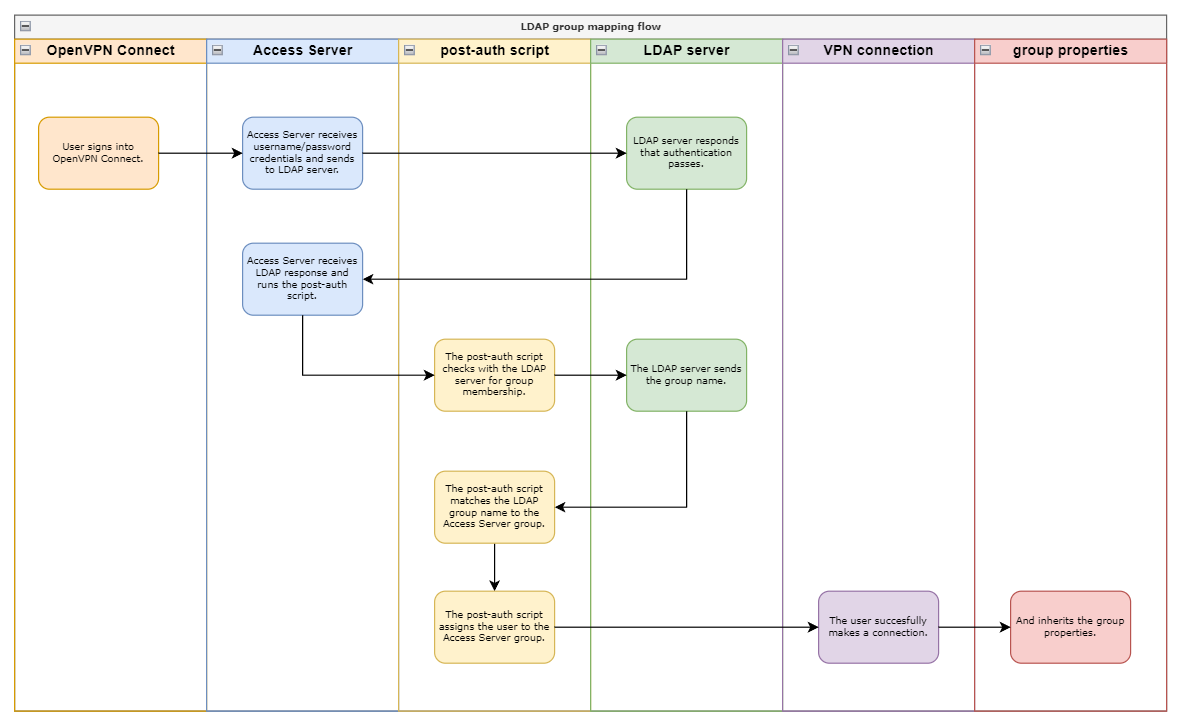
After successful authentication, the Access Server can run a post-auth (post-authentication) Python3 script to perform additional tasks. We provide a post-auth script that reads an LDAP group membership attribute supplied by the LDAP server and uses that to assign the user to a group in Access Server automatically.
Ensure you define these group mappings in the post-auth script and configure the LDAP server to provide the group membership attribute to the Access Server.
To enable LDAP group mapping using a script, follow the steps detailed below:
Configure and enable LDAP authentication.
Configure the LDAP server to provide group membership.
Customize the post-auth script to set up the group mappings.
Install the post-auth script into the Access Server.
The test user signs in and confirms functionality.