Tutorial: Generate a Tech Support Report in Access Server
Generate a technical support report using Access Server's Admin Web UI on version 3.0.0 and newer.
Overview
The Tech Support Report provides OpenVPN Support with a consolidated snapshot of your Access Server’s configuration and diagnostic information. Generating this report helps our support team troubleshoot issues faster and reduces the time spent manually gathering system details.
Prerequisites
Admin Web UI access for option 1.
Console access and the ability to get root privileges.
Access Server version 3.0.0 or newer
Sign in to the Admin Web UI.
Click Advanced.
Click to proceed through the message that displays about the effect of modifying advanced settings.
Click the Tech Support Report tab.
Click Generate Support Report.
Access Server compiles a report that appears in the text field and contains system details, configuration settings, and diagnostic data.
Choose how to retrieve the report:
Click the Copy icon to copy the report text to your clipboard, or
Click Download Report to save it as a file.
Submit the report to OpenVPN Support using the support ticket system.
You can generate a tech support report with Access Server’s API. Choose one of the following methods:
Method 1: Run API calls with cURL
Tip
You can run these API calls directly on your Access Server or from a remote machine.
Generate an authentication token for an admin user:
sacli --user openvpn1 GenerateAuthToken
Where
openvpnis a user with admin privileges. We need a user with admin privileges to generate the needed Authentication Token for this method.This outputs an authentication token, for example:
root@openvpnas:~# sacli --user openvpn GenerateAuthToken
{'expirytime': 1761002715,
 'maxsessiontime': 1761016515,
 'token': 'SESS_TOKEN_t5RT2/S18pEU9PFKBWoXL40NNZring0ntjmSa6hbI6d9SFDxxFF8OEII+qizKaY+J4ub4qT+jDHFuPQ9zHgI+mvRzLu0hsuB+/0BEXFcYeZCHGzg+TE75Fvkn+NV'}
Alternate first step:
You can also generate an authentication token for an admin user using cURL.
Run the following command where
openvpnis an admin user andpass4openvpnis the user password:curl -X 'POST' 'https://203.0.113.5:943/api/auth/login/userpassword' -H 'accept: */*' -H 'Content-Type: application/json' -d '{"request_admin": true, "username": "openvpn","password": "pass4openvpn"}' -kEnsure the user has admin privileges to generate the necessary authentication token for this alternate method.
This outputs an authentication token. Example output:
root@openvpnas:~# curl -X 'POST' 'https://203.0.113.5:943/api/auth/login/userpassword' -H 'accept: */*' -H 'Content-Type: application/json' -d '{"request_admin": true, "username": "openvpn","password": "pass4openvpn"}' -k
{"auth_token":"SESS_TOKEN_9EtCbf/qQbfmox6k6NvAGomUMCR+x3wLAGdzIK/uG+mm00MZD9mxQ4aMjttoebzKRpmAt1ShH4XEgh9pujVgxns2Bbda3SF84vuSeqmZnOkJ1VSiPreCznjQ","expires_after":"2025-10-23T21:00:23.000000Z","renewable_until":"2025-10-24T00:50:23.000000Z","user_properties":{"requires_mfa_enrollment":false,"user_type":"admin","allowed_profiles":["userlogin"],"enforce_strong_passwords":true,"username":"openvpn","allow_password_change":true}}
Use the token to generate the tech support report:
curl -X 'GET' -k --location 'https://203.0.113.511:943/api/support/report' \
--header 'X-OpenVPN-As-AuthToken: <Authentication Token here>2' \
--header 'Content-Type: application/json' \
--data ''
Replace
203.0.113.5with your Access Server IP.Replace
<Authentication Token here>with your generated token.The tech support report prints to the console.
Method 2: Run API calls using 'apicall'
Tip
You can also use sacli's built-in apicall function to perform API requests directly from Access Server.
Run the following command:
sacli --method GET --url 'api/support/report' --value '' apicall
The report prints to the console.
Method 3: Run API calls using the embedded Swagger UI from Access Server
Sign in to the API with an auth token
Enable the API documentation for your Access Server.
Open the API docs in your browser:
https://203.0.113.51:943/api/docs
Replace
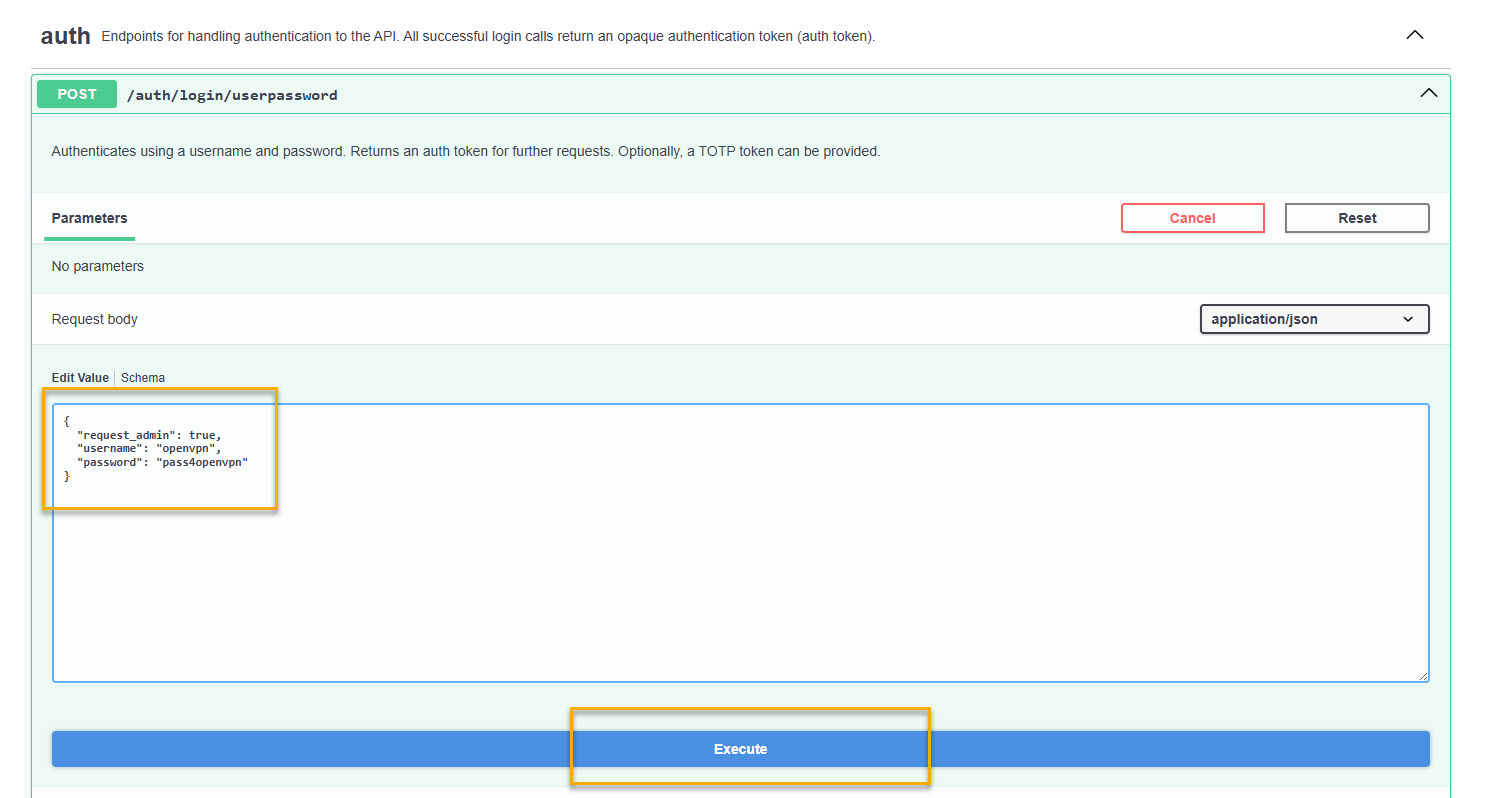
203.0.113.5with your Access Server IP address.In the auth section, click to expand
/auth/login/userpassword.Click Try it out.
The Edit Value box displays.
Replace the schema values with these, where
openvpnis an admin user andpass4openvpnis the user password:{ "request_admin": true, "username": "openvpn", "password": "pass4openvpn" }Click Execute.
The response displays with the auth_token in the Response body:
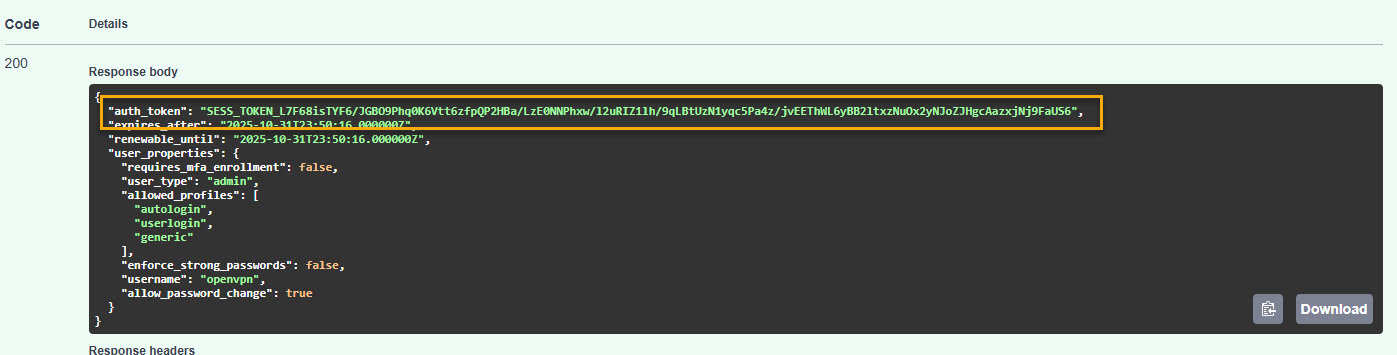
Copy the auth_token value.
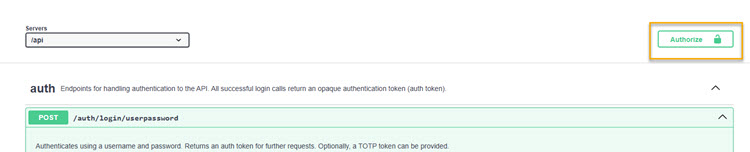
Scroll back up and click Authorize.
The Available authorizations modal displays.
Under AuthToken (apiKey), paste the authentication token in the Value text box.
Click Authorize.
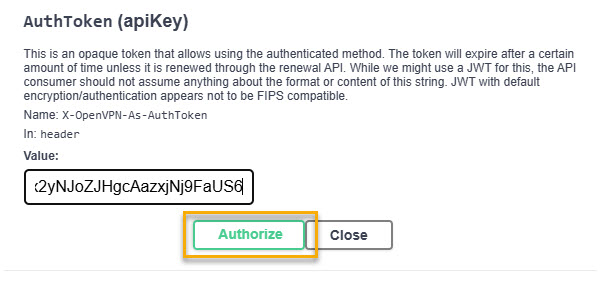
You can now run API calls.
Run API calls
Scroll down to the API endpoint
/support/reportand click to expand it.Click Try it out and Execute.
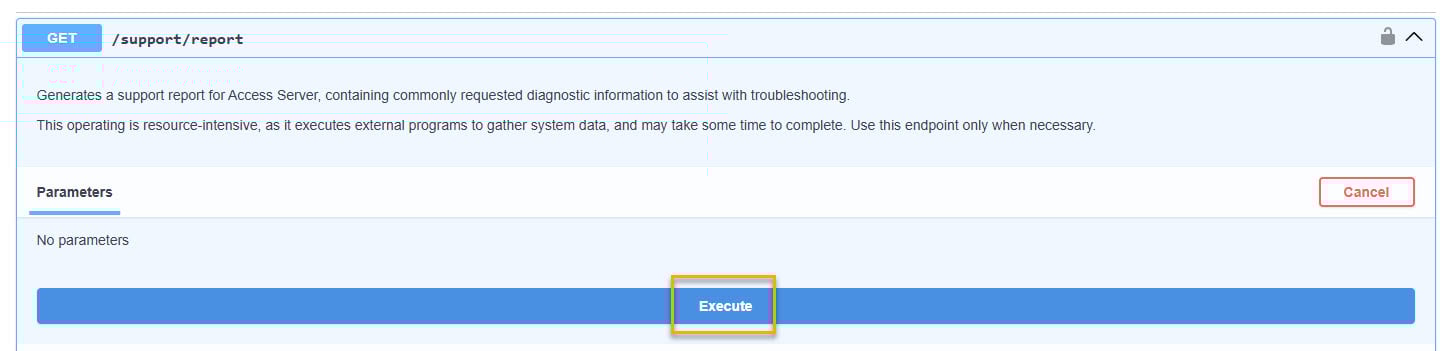
A successful request returns HTTP 200 and displays the tech support report in the response body:
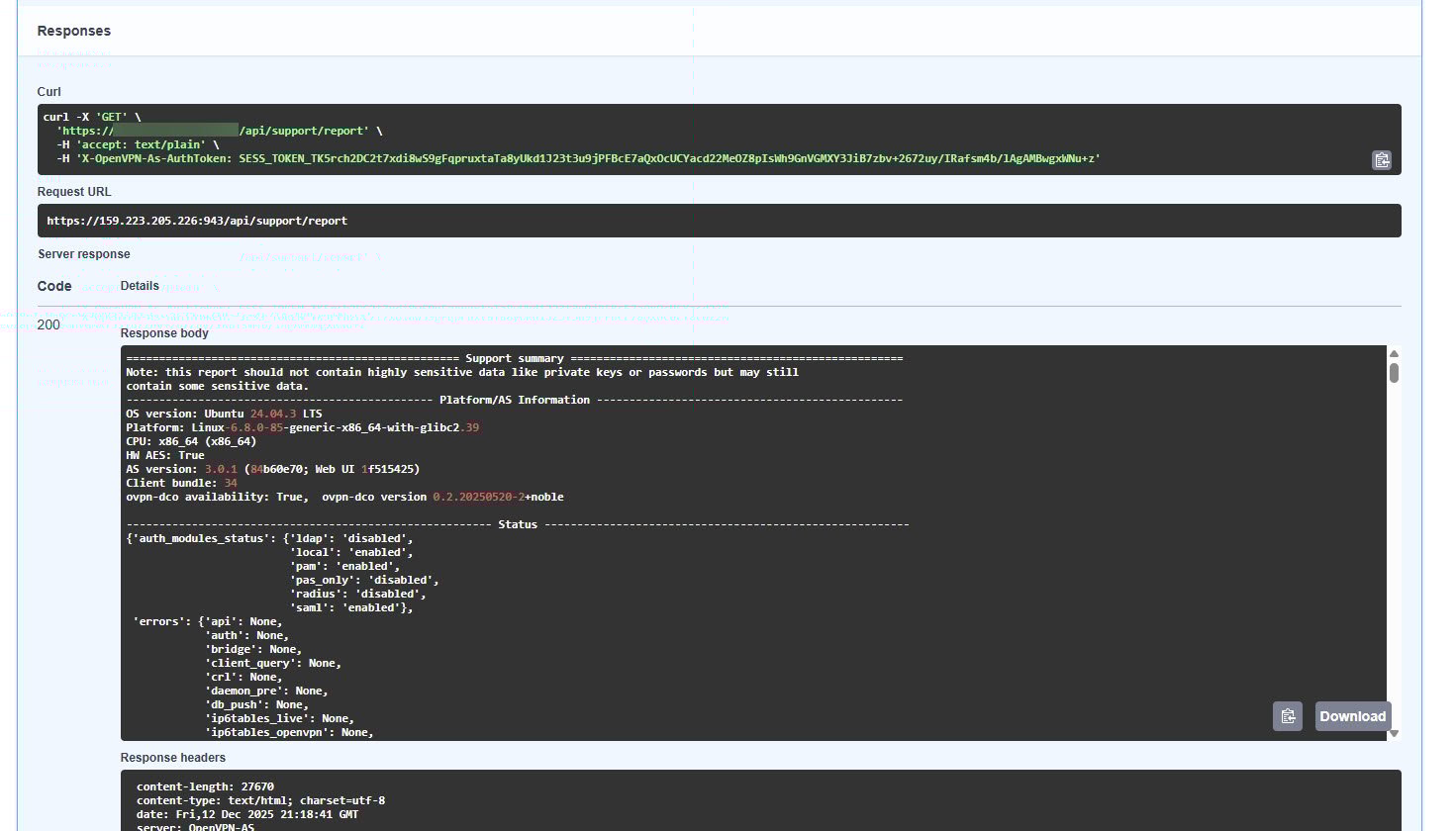
Choose how to retrieve the report:
Click the Copy icon to copy the report text to your clipboard, or
Click Download to save it as a file.
Submit the report to OpenVPN Support using the support ticket system.