Access Server's Session Tokens
Learn how Access Server uses session tokens to manage VPN tunnel authentication, what the default session lifetime settings are, and how to configure them.
After a successful authentication, Access Server issues a session token to the VPN client. The client presents this token each time it needs to re-authenticate. — for example, during TLS key renegotiation or after a brief connection interruption — so the user doesn't need to re-enter their credentials mid-session.
Note
This page covers VPN tunnel session tokens. If you're looking for web UI session timeout settings, refer to Tutorial: How to Change the Web Session Timeout.
Default values at a glance
Setting | Configuration key | Default |
|---|---|---|
Overall session expiration |
| 86100 seconds (~24 hours) |
TLS key renegotiation interval |
| 60 minutes |
Session token lifetime | Derived (2 x TLS interval) | 120 minutes |
To adjust these values, refer to Tutorial: How to Change Access Server's Session Tokens.
Why session tokens matter
Session tokens make VPN connections more resilient and secure without requiring users to re-authenticate constantly.
Seamless reconnection — When a connection is briefly interrupted, due to network instability or a cluster node failure, the VPN client can resume the session using its token rather than starting a new authentication flow. In a cluster setup, the HMAC key is shared between nodes, so a session started on one node can resume on another. This makes session tokens essential for high availability.
MFA and certificate handling — When multi-factor authentication is enabled, session tokens mean users aren't prompted for their MFA code during routing TLS key renegotiations or brief reconnections. Server-locked profiles also benefit: without session tokens, these profiles would require authenticating twice in sequence.
Credential security — Because the session token handles re-authentication, Access Server doesn't need to hold user credentials in memory between authentications. This reduces the credential exposure surface during an active session.
Note
Auto-login profiles don't use session tokens. They authenticate using their certificates only.
How session token validation works
When the VPN client presents a session token, Access Server runs three checks before accepting it:
HMAC signature — The server verifies the token's HMAC signature to confirm it was issued by a trusted Access Server and hasn't been tampered with.
Session age — The session start timestamp in the token must be no older than the value of
vpn.server.session_expire. If not explicitly configured, this defaults to approximately 24 hours.Token age — the token creation timestamp must be no older than twice the TTLS key renegotiation interval. With default settings, this means a token is valid for up to 2 hours (2 × 60 minutes).
If all three checks pass, the server and client negotiate new encryption keys, and the session resumes. Access Server issues a new token to the client that keeps the original session-start timestamp but carries an updated creation timestamp.
If any check fails, the session ends, and the user needs to authenticate again.
Session lifetime and how it works
An active VPN session stays alive as long as the current TLS encryption key is valid. A new TLS key can be obtained either through full authentication or through a successful session token exchange.
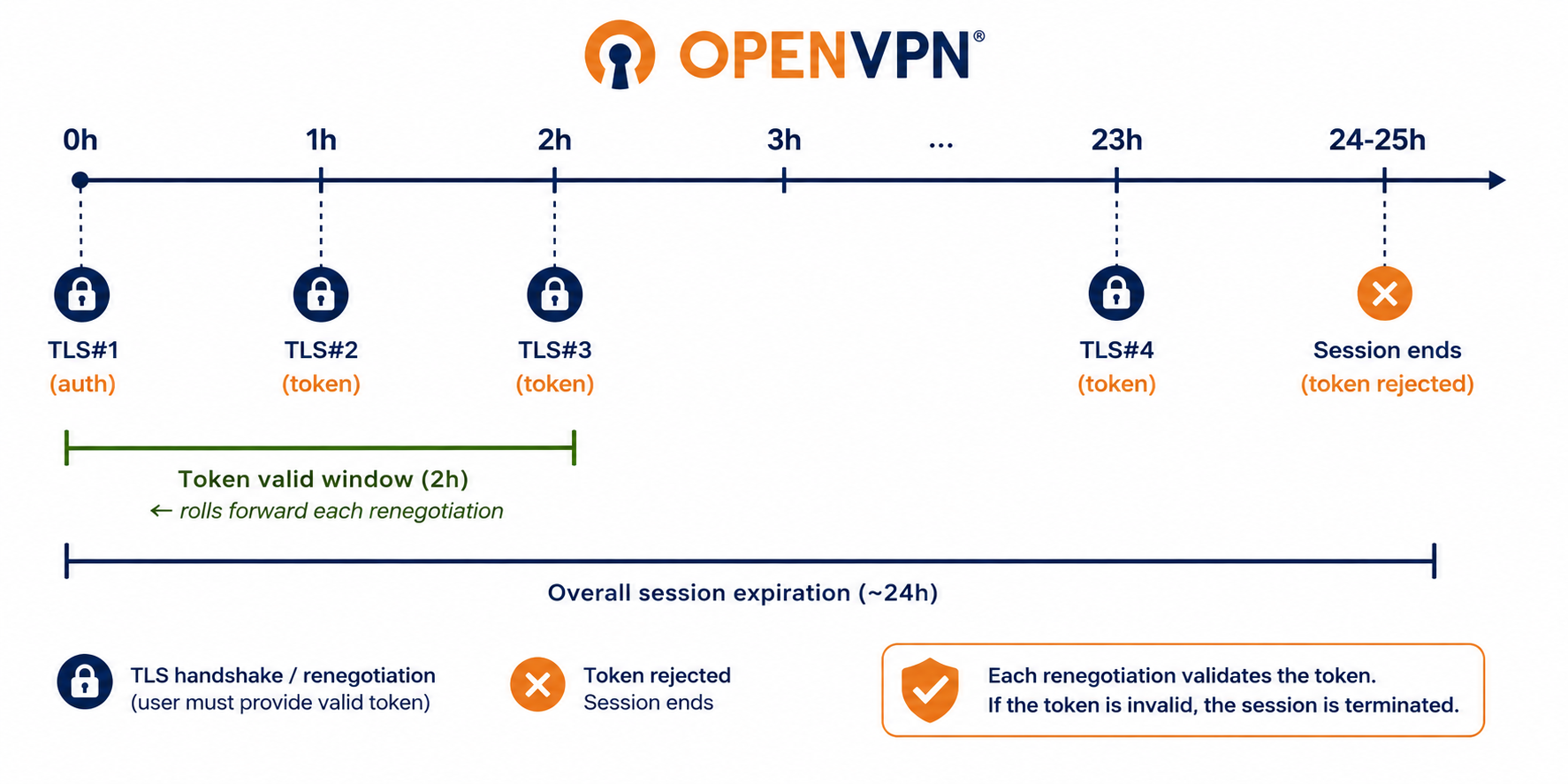
With default settings, a single VPN session works like this:
Access Server forces a TLS key refresh every 60 minutes.
A session token is valid for 120 minutes (2 × the TLS interval), so it can cover at least two renegotiations.
The overall session expires after approximately 24 hours, after which the session token can no longer be used to obtain a new TLS key.
A typical uninterrupted session uses four TLS keys before the session expires.
Example: How session expiration works in practice
A user establishes a VPN connection and stays connected for nearly 24 hours. At the 23-hour and 50-minute mark, their connection briefly drops due to a network issue. The VPN client reconnects and presents its session token. Access Server accepts it — the session is still within the 24-hour expiration window — and negotiates a new TLS key.
One hour later, Access Server forces another TLS key renegotiation. This time, the session token is rejected because the overall 24-hour session has now expired. The current TLS key remains usable until it too expires, at which point the VPN session ends, and the user needs to sign in again.
With default settings, a VPN session can last 24–25 hours before requiring re-authentication.
Automatic client inactivity disconnect threshold
Access Server can instruct a connected VPN client to gracefully disconnect when the connection is idle. Idle state is determined by a byte-transfer threshold over a specified time frame. When traffic falls below this threshold, the client disconnects automatically.
To configure the inactivity threshold, refer to Tutorial: Set the Threshold to Disconnect Inactive Clients.
See also
Tutorial: How to Adjust Access Server's Session Tokens — CLI commands for configuring VPN session token settings.
Tutorial: How to Change the Web Session Timeout — configure web UI session inactivity timeout and maximum renewal time.
Tutorial: Set the Threshold to Disconnect Inactive Clients — configure automatic disconnect for idle VPN sessions.