Tutorial: Setting Your VPN Client to Automatically Connect With Your VPN at Startup
Overview
This guide shows you how to set OpenVPN Connect to connect to Access Server automatically using an auto-login connection profile.
Here are the steps to do that, outlined in the section below:
The user installs OpenVPN Connect.
The admin allows an auto-login connection profile for the user.
The user downloads an auto-login profile.
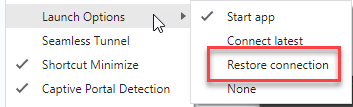
The user sets the OpenVPN Connect launch options.
OpenVPN Connect connects to the VPN automatically at startup.
Prerequisites
An installed Access Server.
An Access Server user account for the end user.