
Tips for Solving Subscription Activation Issues for AWS PAYG
This troubleshooting guide is for users who have purchased the PAYG offering from AWS for Access Server. If you're facing issues with your subscription, this guide will help you verify your setup, activate your subscription, remove it if necessary, and troubleshoot common problems. Please note that this guide is specific to the subscription licensing model for AWS PAYG.
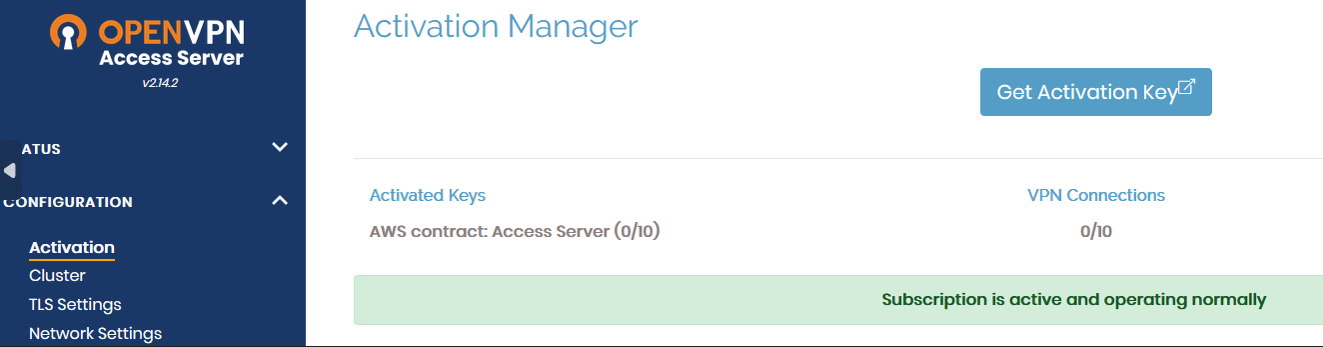
The OpenVPN Access Server PAYG offering will activate the subscription license key for you while deploying it via CloudFormation Stack, as explained here AWS PAYG. In a typical scenario, the subscription is displayed in the Configuration > Activation page of the Admin Web UI like this:
Prerequisites for troubleshooting
Ensure you have these Linux Package Tools for troubleshooting:
For Ubuntu/Debian:
apt update && apt -y install dnsutils curl netcatFor RHEL:
dnf update && dnf -y install bind-utils curl nmap
This error displays under Configuration > Activation in the Admin Web UI:
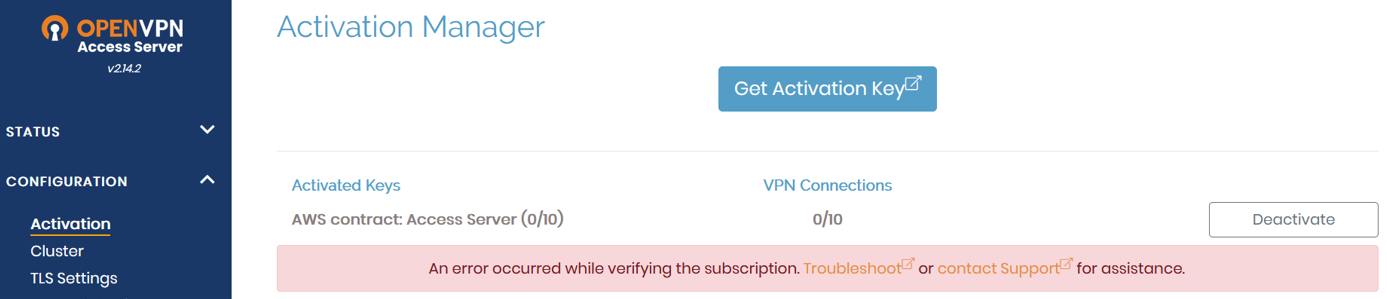
This error can occur due to one of these reasons:
Follow these steps to determine if this is causing the error for you:
Connect to the console and get root privileges.
Run this command to perform a DNS lookup with the domain name asb.sts.openvpn.net:
nslookup asb.sts.openvpn.netIf your Linux machine can't resolve the DNS for asb.sts.openvpn.net, an error like this displays:
root@ip-192-168-150-83:~# nslookup asb.sts.openvpn.net
;; Got SERVFAIL reply from 127.0.0.53
Server: 127.0.0.53
Address: 127.0.0.53#53

** server can't find asb.sts.openvpn.net: SERVFAIL
An expected output should look like this:
root@ip-192-168-150-83:~# nslookup asb.sts.openvpn.net
Server: 127.0.0.53
Address: 127.0.0.53#53

Non-authoritative answer:
Name: asb.sts.openvpn.net
Address: 104.16.231.25
Name: asb.sts.openvpn.net
Address: 104.16.232.25
Solution: Check the DNS servers configured on your Linux machine and update them if needed. Use a reliable DNS server to ensure proper name resolution:
Google DNS:
8.8.8.8Cloudflare DNS:
1.1.1.1Internal DNS server: Use an internal server that can perform DNS resolution correctly without interception or redirection.
Follow these steps to determine if this is causing the error for you:
Connect to the console and get root privileges.
Use Netcat (nc) to check the connectivity to TCP port 443:
nc -z -v -w 5 asb.sts.openvpn.net 443If your Linux machine can't communicate with asb.sts.openvpn.net on TCP port 443, the message displays that the connection times out:
root@ip-192-168-150-83:~# nc -z -v -w 5 asb.sts.openvpn.net 443
nc: connect to asb.sts.openvpn.net port 443 (tcp) timed out: Operation now in progress
nc: connect to asb.sts.openvpn.net port 443 (tcp) timed out: Operation now in progress
An expected output should look like this:
Connection to asb.sts.openvpn.net 443 port [tcp/https] succeeded!
Solution: Verify whether any network components are blocking or redirecting traffic. Check the following on AWS:
Security Groups: Ensure the security group attached to your EC2 instance allows inbound and outbound traffic on TCP 443.
Network Access Control Lists (NACLs): Check that the subnet's NACLs aren't blocking traffic to or from the EC2 instance.
Route Tables: Verify that the route table associated with your VPC correctly routes traffic to and from the internet or your internal network.
Proxy or NAT Gateway: If your instance is in a private subnet, ensure that the NAT gateway or NAT instance is configured correctly to allow outgoing internet traffic.
ISP and External Firewalls: Though less common, external firewalls or network policies outside of AWS (e.g., at your corporate network) could affect traffic to your EC2 instance.
Connect to the console and get root privileges.
Diagnose the SSL/TLS issues by checking the HTTPS connection and SSL certificate chain:
curl -vvk https://asb.sts.openvpn.net
echo quit | openssl s_client -showcerts -connect asb.sts.openvpn.net:443 -servername asb.sts.openvpn.net | grep "OpenVPN Inc"
If something's blocking the SSL/TLS handshake when the instance hosting your Access Server is trying to connect to asb.sts.openvpn.net on TCP port 443, one of these errors might display:
root@ip-192-168-150-83:~# curl -vvk https://asb.sts.openvpn.net
curl: (35) OpenSSL SSL_connect: Connection reset by peer in connection to asb.sts.openvpn.net:443
root@ip-192-168-150-83:~# echo quit | openssl s_client -showcerts -connect asb.sts.openvpn.net:443 -servername asb.sts.openvpn.net | grep "OpenVPN Inc" OpenSSL SSL_connect: Connection reset by peer in connection to asb.sts.openvpn.net:443
Solution: Verify whether any network components are blocking or redirecting traffic. Check the following on AWS:
Security Groups: Ensure the security group attached to your EC2 instance allows inbound and outbound traffic on TCP 443.
Network Access Control Lists (NACLs): Check that the subnet's NACLs aren't blocking traffic to or from the EC2 instance.
Route Tables: Verify that the route table associated with your VPC correctly routes traffic to and from the internet or your internal network.
Proxy or NAT Gateway: If your instance is in a private subnet, ensure that the NAT gateway or NAT instance is configured correctly to allow outgoing internet traffic.
ISP and External Firewalls: Though less common, external firewalls or network policies outside of AWS (e.g., at your corporate network) could affect traffic to your EC2 instance.
Proxy DNS servers, such as Cisco Umbrella/OpenDNS, may return incorrect IP addresses, causing subscription activation to fail.
Solution: Refer to this knowledge base article: Subscription activation failure due to proxy DNS server.
When migrating to an Access Server PAYG instance, such as from an AWS tiered offering, you should manually activate the subscription license key with the following command:
sacli -v $(grep '^license=' /var/lib/cloud/instance/user-data.txt | cut -d'=' -f2-) LoadSubscriptionAfter running this command, you may encounter the following errors:
This happens when the Linux machine (EC2) hosting Access Server can't resolve DNS for asb.sts.openvpn.net.
root@ip-192-168-150-83:~# sacli -v $(grep '^license=' /var/lib/cloud/instance/user-data.txt | cut -d'=' -f2-) LoadSubscription
Verifying subscription...
Failed: [Failure instance: Traceback (failure with no frames): <class 'pyovpn.util.error.Passthru'>: japicli: E_RESOLVE HTTPCore Asio resolve_callback: Host not found (non-authoritative), try again later
Solution: Verify DNS resolution with the below command:
nslookup asb.sts.openvpn.netCheck the DNS servers configured on the Linux machine (EC2) and update to a reliable option if needed:
Google DNS:
8.8.8.8Cloudflare DNS:
1.1.1.1Internal DNS server: Use an internal server that can perform DNS resolution correctly without interception or redirection.
This happens when the Linux machine (EC2) hosting Access Server can't resolve DNS for asb.sts.openvpn.net OR this happens also when the Linux machine (EC2) hosting Access Server can't communicate with asb.sts.openvpn.net on TCP port 443.
root@ip-192-168-150-83:~# sacli -v $(grep '^license=' /var/lib/cloud/instance/user-data.txt | cut -d'=' -f2-) LoadSubscription
Verifying subscription...
Failed: [Failure instance: Traceback (failure with no frames): <class 'pyovpn.util.error.Passthru'>: japicli: E_GENERAL_TIMEOUT General timeout
Solution: Verify the DNS resolution and TCP 443 connectivity with the below commands:
nslookup asb.sts.openvpn.net
nc -z -v -w 5 asb.sts.openvpn.net 443
Depending on the issue, either check/change the DNS servers configured for your Linux machine (EC2) OR check if any security groups, NACLs, route tables, proxy, NAT gateways, ISPs, or external firewalls are blocking or redirecting the traffic to another side/path.
This happens when the Linux machine (EC2) hosting Access Server can't communicate with asb.sts.openvpn.net on TCP port 443.
root@ip-192-168-150-83:~# sacli -v $(grep '^license=' /var/lib/cloud/instance/user-data.txt | cut -d'=' -f2-) LoadSubscription
Verifying subscription...
Failed: [Failure instance: Traceback (failure with no frames): <class 'pyovpn.util.error.Passthru'>: japicli: E_CONNECT HTTPCore Asio handle_tcp_connect: Connection refused"
Solution: Verify TCP 443 connectivity with the below command:
nc -z -v -w 5 asb.sts.openvpn.net 443Check if any security groups, NACLs, route tables, proxy, NAT gateways, ISPs, or external firewalls are blocking or redirecting the traffic to another side/path.
This happens when the SSL/TLS handshake is being blocked when the EC2 instance hosting Access Server tries to connect to asb.sts.openvpn.net on TCP port 443.
root@ip-192-168-150-83:~# sacli -v $(grep '^license=' /var/lib/cloud/instance/user-data.txt | cut -d'=' -f2-) LoadSubscription
Verifying subscription...
Failed: [Failure instance: Traceback (failure with no frames): <class 'pyovpn.util.error.Passthru'>: japicli: E_EXCEPTION HTTPCore Exception tcp_read_handler: OpenSSLContext::SSL::read_cleartext: BIO_read failed, cap=2048 status=-1: error:1416F086:SSL routines:tls_process_server_certificate:certificate verify failed
Solution: Verify the SSL/TLS handshake while the Linux machine (EC2) hosting Access Server is trying to communicate with asb.sts.openvpn.net on TCP port 443 with the below commands:
curl -vvk https://asb.sts.openvpn.net
echo quit | openssl s_client -showcerts -connect asb.sts.openvpn.net:443 -servername asb.sts.openvpn.net | grep "OpenVPN Inc"
Check if any security groups, NACLs, route tables, proxy, NAT gateways, ISPs, or external firewalls are blocking the SSL/TLS handshake.
This happens when the SSL/TLS handshake is being blocked when the EC2 instance hosting Access Server tries to connect to asb.sts.openvpn.net on TCP port 443 OR there's a proxy DNS server (e.g., Cisco Umbrella/OpenDNS) intercepting connection with asb.sts.openvpn.net.
root@ip-192-168-150-83:~# sacli -v $(grep '^license=' /var/lib/cloud/instance/user-data.txt | cut -d'=' -f2-) LoadSubscription
Verifying subscription...
Failed: [Failure instance: Traceback (failure with no frames): <class 'pyovpn.util.error.Passthru'>: japicli: E_EXCEPTION HTTPCore Exception tcp_read_handler: OpenSSLContext::SSL::read_cleartext: BIO_read failed, cap=2048 status=-1: error:14094410:SSL routines:ssl3_read_bytes:sslv3 alert handshake failure
Solution: Verify the SSL/TLS handshake while the Linux machine (EC2) hosting Access Server is trying to communicate with asb.sts.openvpn.net on TCP port 443 with the below commands:
curl -vvk https://asb.sts.openvpn.net
echo quit | openssl s_client -showcerts -connect asb.sts.openvpn.net:443 -servername asb.sts.openvpn.net | grep "OpenVPN Inc"
Depending on the issue, check if any security groups, NACLs, route tables, proxy, NAT gateways, ISPs, or external firewalls are blocking the SSL/TLS handshake OR if there's a proxy DNS server such as Cisco Umbrella (OpenDNS), refer to this knowledgebase article: Subscription activation failure due to proxy DNS server.