Tutorial: Configure Domain Routing Exclusion and Bypass Rules Using the Access Server CLI
Learn how to configure and validate domain routing exclusion and bypass rules in OpenVPN Access Server using the CLI — including how to create rulesets, define bypass and match-all rules, and verify that traffic is correctly excluded from or routed through the VPN tunnel.
Overview
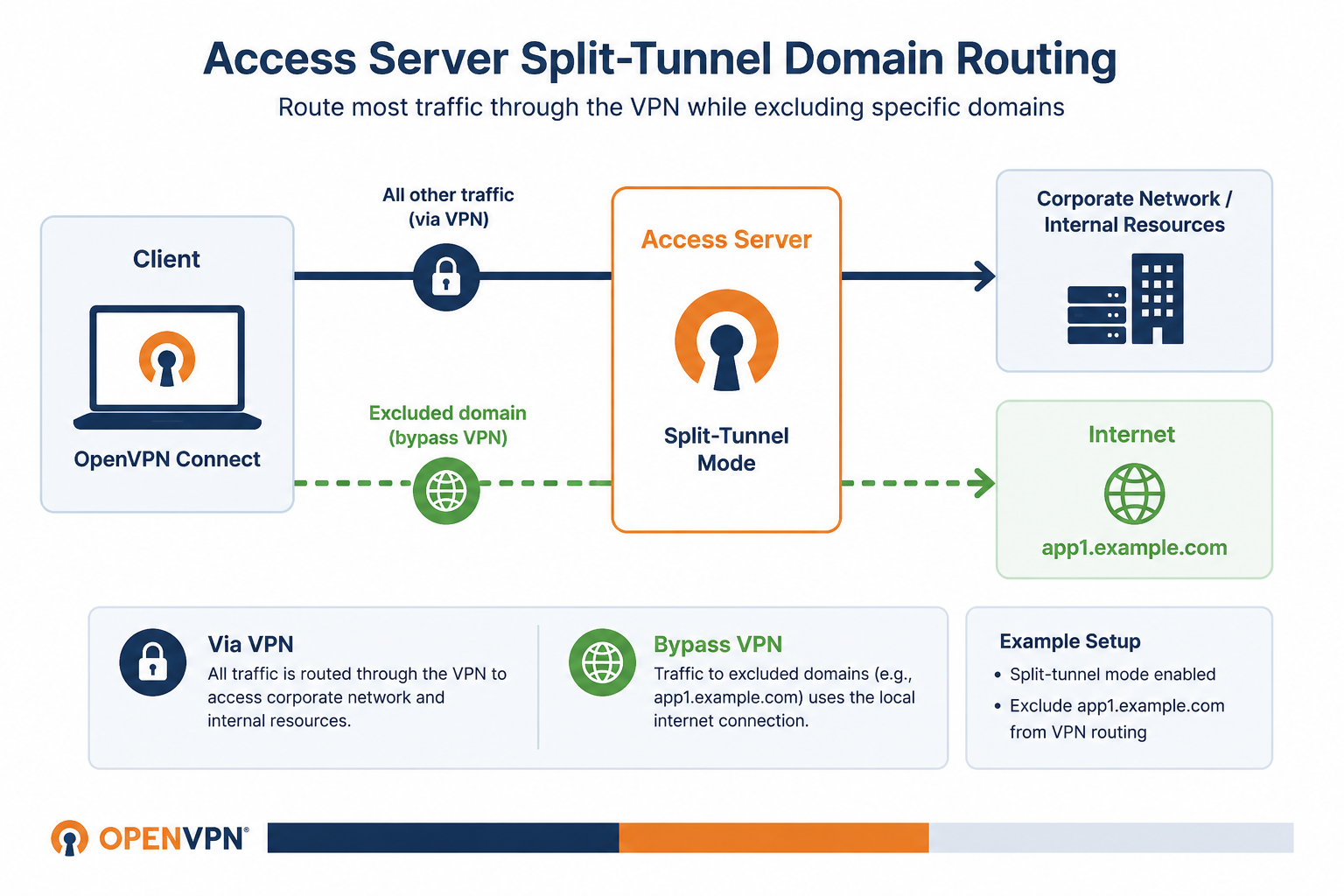
This tutorial explains how to configure and validate domain routing exclusion and bypass rules in Access Server using the command-line interface (CLI).
In this example, an IT administrator has deployed Access Server in split-tunnel mode and wants most traffic to route through the VPN, while allowing traffic to a specific application (app1.example.com ) to bypass the VPN and use the local internet connection instead.
Use this tutorial to:
Configure domain routing exclusion and bypass rules.
Verify that traffic is routed as expected.
Test domain-based routing behavior in a split-tunnel environment.
Prerequisites
Access Server 3.2.0 or newer.
Root access to your Access Server's console.
DNS proxy enabled on your Access Server.
One or more users or groups configured.
Note
In our documentation, we use example IPv4 addresses and subnets reserved for documentation, such as 192.0.2.0/24, 198.51.100.0/24, and 203.0.113.0/24.
Ensure you replace them with valid IPv4 addresses and subnets for your network(s).
Connect to the console and get root privileges.
Create a global ruleset:
sacli --name "__DEFAULT___default_ruleset" --comment "Default ruleset for global domain rules" AccessControlRulesetsAdd
Example output:
1
Note this as the returned ruleset ID.
Create a bypass rule for
app1.example.com:sacli --ruleset_id "1" --rule_type "domain_routing" --match_type "domain" --match_data "app1.example.com" --action "bypass" --position "1" --comment "" AccessControlRulesAdd
Parameter
Value
ruleset_idUse the value from the global ruleset output.
match_typewithdomainMatch an exact domain. For example,
app1.example.com.match_typewithdomain_or_subdomainMatch wildcard domains. For example,
example.com.Tip
Wildcard domain syntax differs between interfaces:
CLI:
example.comAdmin Web UI:
*.example.com
match_dataDomain to route.
actionwithbypassBypasses traffic to the specified domain.
positionUse the value for the next available position noted above.
Create a match-all rule to send all remaining traffic through the VPN:
sacli --ruleset_id "1" --rule_type "domain_routing" --match_type "domain_or_subdomain" --match_data "" --action "nat" --position "2" --comment "" AccessControlRulesAdd
Tip
Set
--match_datato an empty value to match all domains. This rule must be placed after any bypass rules.Attach the ruleset globally:
sacli --user "__DEFAULT__" --position "0" --ruleset_id "1" AccessControlUserRulesetsAdd
Tip
Global rules use
__DEFAULT__. Replace this value when applying rules to specific users or groups.Apply the changes:
sacli start
List rulesets:
sacli AccessControlRulesetsList
Example output:
[
  {
    "comment": "Default ruleset for global domain rules",
    "id": 1,
    "name": "__DEFAULT___default_ruleset",
    "owner": "__DEFAULT__",
    "owner_type": "user_default",
    "position": 0
  }
]
Note the ruleset ID.
List rules in the ruleset:
sacli --ruleset_id '1'1 AccessControlRulesList
Replace the
ruleset_idvalue with the value from the ruleset list output.Example output:
[
  {
    "action": "bypass",
    "comment": "",
    "id": 1,
    "match_data": "app1.example.com",
    "match_type": "domain",
    "position": 1,
    "ruleset_id": 1,
    "type": "domain_routing"
  },
  {
    "action": "nat",
    "comment": "",
    "id": 2,
    "match_data": "",
    "match_type": "domain_or_subdomain",
    "position": 2,
    "ruleset_id": 1,
    "type": "domain_routing"
  }
]
Confirm the bypass rules include the expected values. Example:
action: bypassmatch_data: app1.example.com
In this step, connect to the VPN as a user and generate traffic to app1.example.com to confirm it's bypassed, then test a second domain to confirm all other traffic routes through the VPN.
Connect a VPN client.
From the Access Server console, enable DNS proxy debug logging:
echo "DEBUG_DNSPROXY=true" >> /usr/local/openvpn_as/etc/as.conf && systemctl restart openvpnas
Start a packet capture on Access Server:
tcpdump -eni any icmp
From the client, ping
app1.domain.com:ping app1.example.com
Example output:
PING app1.example.com (203.0.113.1) 56(84) bytes of data.
64 bytes from 203.0.113.1: icmp_seq=1 ttl=53 time=3.46 ms
--- app1.example.com ping statistics ---
1 packets transmitted, 1 received, 0% packet loss, time 0ms
rtt min/avg/max/mdev = 3.456/3.456/3.456/0.000 ms
The domain resolves to its public IP address. Access Server doesn't map it to an internal IP address from the internal DNS IP range, which confirms the traffic was bypassed and isn't routing through the VPN tunnel.
On Access Server, check the DNS proxy log:
grep "DNSPROXY" /var/log/openvpnas.log
Example output:
2026-05-03T10:01:14-0500 [stdout#info] [DNSPROXY] OUT: '[10] Received query from 172.27.232.2:61204'
2026-05-03T10:01:14-0500 [stdout#info] [DNSPROXY] OUT: '[10] Forwarding query for app1.example.com. IN A'
2026-05-03T10:01:14-0500 [stdout#info] [DNSPROXY] OUT: '[10] Received response'
The DNS proxy forwarded the query without mapping it to an internal IP, and the
tcpdumpoutput shows no traffic, confirming the bypass is working correctly.
From the client, ping a second domain to confirm all other traffic routes through the VPN:
ping app2.example.com
Example output:
PING app2.example.com (100.64.0.2) 56(84) bytes of data.
64 bytes from 100.64.0.2: icmp_seq=1 ttl=53 time=3.46 ms
--- app2.example.com ping statistics ---
1 packets transmitted, 1 received, 0% packet loss, time 0ms
rtt min/avg/max/mdev = 3.456/3.456/3.456/0.000 ms
Access Server maps
app2.example.com(real IP203.0.113.2) to an internal IP (100.64.0.2) from the DNS internal IP range (100.64.0.0/10by default), confirming traffic is routing through the VPN tunnel.
On Access Server, check the DNS proxy log:
grep "DNSPROXY" /var/log/openvpnas.log
Example output:
2026-05-03T10:13:23-0500 [stdout#info] [DNSPROXY] OUT: '[148] Received query from 172.27.232.2:52157'
2026-05-03T10:13:23-0500 [stdout#info] [DNSPROXY] OUT: '[148] Forwarding query for app2.example.com. IN A'
2026-05-03T10:13:23-0500 [stdout#info] [DNSPROXY] OUT: '[148] Received response'
2026-05-03T10:13:23-0500 [stdout#info] [DNSPROXY] OUT: '[148] Changed address for app2.example.com: 203.0.113.2 -> 100.64.0.2'
The DNS proxy intercepted the query and remapped the address to an internal IP address, confirming that the match-all rule is routing traffic through the VPN as expected.
Tip
Debug flags can generate large amounts of log data. After collecting the necessary information, remove the debug flag and restart Access Server to prevent excessive logging.
Use this step if you need more granular control. For example, you can bypass traffic to app1.example.com while routing all other example.com traffic through the VPN.
Create a bypass rule for
app1.example.com:sacli --ruleset_id "1" --rule_type "domain_routing" --match_type "domain" --match_data "app1.example.com" --action "bypass" --position "1" --comment "" AccessControlRulesAdd
Create a domain routing rule to send all
example.comwildcard traffic through the VPN:sacli --ruleset_id "1" --rule_type "domain_routing" --match_type "domain_or_subdomain" --match_data "example.com" --action "nat" --position "2" --comment "" AccessControlRulesAdd
This routes traffic to
app2.example.com,app3.example.com, and any otherexample.comsubdomains through the VPN, whileapp1.example.comremains bypassed.